Yesterday, on October 14th, 2023. I was a visiting speaker at a college. In post discussions with a lot of students, I asked something very interesting which came to my mind at that moment.
What if you didn’t have nmap, ncat, netcat, telnet in a machine; how would you enumerate a port looking for lateral movement options?
I ended up answering “/dev/tcp” do you remember it? we have pentestmonkey reverse shell with it. Which took me to thinking…
DAMN! We can probably PORT SCAN WITH IT!
Which is the entire inspiration of this blog, today we’ll be looking at some basics about /dev/tcp for those who’ve never used it and look at some nifty tips and tricks we can do with it.
Introducing /dev/tcp
/dev/tcp is a special file path used in some Unix-like operating systems, including Linux, and are associated with the Bash shell. These paths provide a way to interact with remote servers using TCP (Transmission Control Protocol) connection directly from the command line or within shell scripts.
If bash was compiled with –enable-net-redirections, it has the capability of using a TCP and UDP redirections with the help of 36, 39 devices under the 30 char devices definition.

/dev/tcp
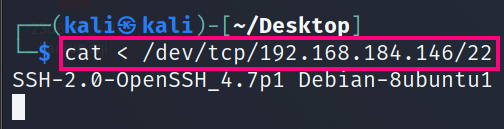
The /dev/tcp file path is used for TCP connections. It allows you to establish a connection to a remote server and interact with it over the TCP/IP protocol. Here’s a basic example tried against metasploitable (in a one-liner);
cat < /dev/tcp/192.168.184.146/22This is what that looks like on a terminal:
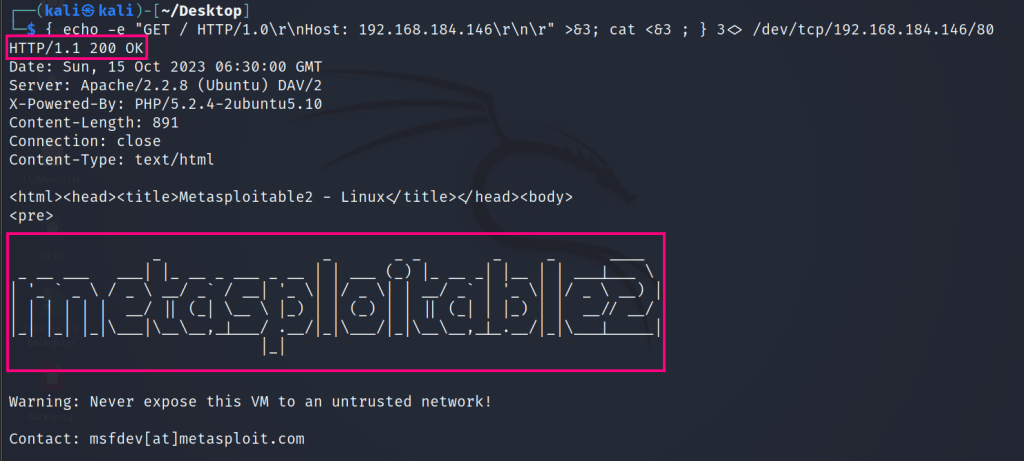
It is also possible to open interactive connections, for example http (in a one liner);
{ echo -e "GET / HTTP/1.0\r\nHost: 192.168.184.146\r\n\r" >&3; cat <&3 ; } 3<> /dev/tcp/192.168.184.146/80This is what happens when you run the above command:
And with a little bit of scripty magic, this is what the script looks like, took about a minute to complete and the output is something pretty useful!
#!/bin/bash

for i in {1..65535}; do timeout 1 bash -c "echo >/dev/tcp/$1/$i 2>/dev/null"  && echo "For $1 Port $i is open" >> portenum.txt; done

Grabbing Banner (Not Bruce)
With the above logic we can use the head command to print the first line the server responds with; I’ve also written the script in a way that if it reaches common http ports, it will send a GET request instead, and we can see a short portion of the response (5 lines).
#!/bin/bash

output_file="banner.txt"

for i in {1..65535}; do
    if [[ $i -eq 80 || $i -eq 443 || $i -eq 8000 || $i -eq 8080 || $i -eq 8443 || $i -eq 9000 || $i -eq 9080 || $i -eq 9443 ]]; then
        payload="{ echo -e \"GET / HTTP/1.0\\r\\nHost: $1\\r\\n\\r\" >&3; head -n 5 <&3 ; } 3<> /dev/tcp/$1/$i"
    else
        payload="head -n 1 < /dev/tcp/$1/$i"
    fi

    response=$(timeout 2 bash -c "$payload 2>/dev/null")

    if [[ $? -eq 0 ]]; then
        echo "Port $i: $response" >> "$output_file"
    fi
done
This is what grabbing the banners look like:
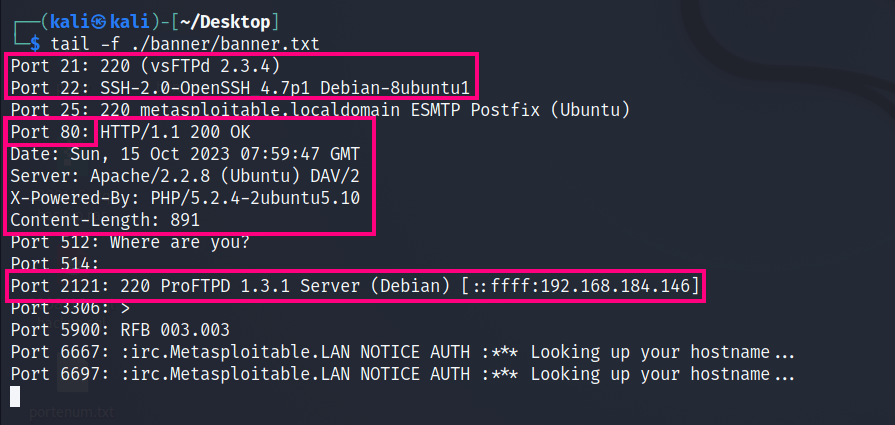
Some ports of course, do not respond to these messages; but its possible to enumerate these ports for their services, this logic can be continued for specialized port provided they can “talk” to you.
/dev/udp
Due to the complex nature of it’s protocol, it does not respond the same way, some reasons for it as below;
- Connectionless Nature of UDP: UDP is a connectionless protocol, and the lack of an error doesn’t necessarily mean the port is open.
- Firewall and Network Configurations: The result might be affected by firewall rules or network configurations.
- Reliability: This method may not be as reliable or accurate as specialized tools designed for port scanning.
I spent some time and, read about 25-35 different pages, where, there was even the slightest mention of /dev/udp but it evades us as usual. So for now I think I’ll leave it at that. If I find something; I’ll definitely come writing about it
Closing Note
This is a nifty trick that will come in handy in super restricted environments. and the best part is that; access to sudo or root level privileges are not heavily required! All you need is BASH! and works like a charm for common ports 🙂
Until Next Time!
What I saw when researching for this:
https://kb.vmware.com/s/article/50122239
https://gist.github.com/dasgoll/5c4d0aefa673ebe469b86dfef106f92f
https://stackoverflow.com/questions/61966798/silence-dev-tcp-host-port-redirection-errors
https://superuser.com/questions/1647542/dev-tcp-hostname-80-as-an-interactive-session
https://superuser.com/questions/621870/test-if-a-port-on-a-remote-system-is-reachable-without-telnet
 acc3ssp0int
Leave a comment